
Short answer: The best ABA practice management software is the platform that makes your clinic’s operational handoffs visible, repeatable, and auditable. That usually includes scheduling, authorizations, billing workflow, staff operations, reporting, permissions, and exports. It does not automatically mean the platform has the best clinical data model or that every claim will be paid.
Table of Contents
- What Makes the Best ABA Practice Management Software?
- How Is It Different From ABA EHR or Data Software?
- What Should Practice Management Software Actually Manage?
- Which Features Matter for a Growing ABA Clinic?
- How Can You Compare Vendors Without Falling for Feature Lists?
- How Should You Estimate Total Cost?
- What Should You Ask About Privacy and Security?
- What Should You Test in a Demo?
- How Do You Roll Out a New Platform?
- ABA Practice Management Software FAQ
- Key Takeaway
- Take the Free BCBA Mock Exam
Software comparison pages often make the decision look like a contest between long feature lists. A BCBA team needs a more useful test: can the system help the right person complete the right task, preserve the evidence, and recover when something goes wrong? Use this guide to define your workflow, compare vendors consistently, and request proof before signing a contract.
What Makes the Best ABA Practice Management Software?
ABA practice management software is an operations platform for running a behavior-analytic practice. Depending on the product, it may connect referrals, intake, scheduling, staff availability, authorization periods, claims preparation, payment follow-up, payroll inputs, supervision reminders, and management reporting. Some products also include an EHR or session-data tools, while others integrate with clinical systems.
The word “best” cannot be answered without a clinic context. A solo BCBA may need a simple calendar, authorization tracker, and clean invoice workflow. A multi-site provider may need role-based permissions, staff capacity planning, payer rules, location-level reporting, and reliable integrations. Start with the work your team must complete every week, not with a vendor’s homepage.
How Is It Different From ABA EHR or Data Software?
Practice management and clinical software overlap, but they answer different questions. Practice management asks whether the organization can schedule services, protect capacity, manage authorizations, prepare billing information, coordinate staff, and see operational performance. An ABA EHR or data platform asks whether the clinical record can preserve assessments, operational definitions, measurements, program versions, session notes, graphs, and clinical decisions.
One platform can offer both layers, but do not assume that a strong calendar proves that the measurement model is sound, or that a beautiful graph proves that authorizations and claims are managed well. During evaluation, mark each requirement as clinical, operational, financial, or security. This prevents a broad “all-in-one” label from hiding a gap that matters to your BCBA team.
What Should Practice Management Software Actually Manage?
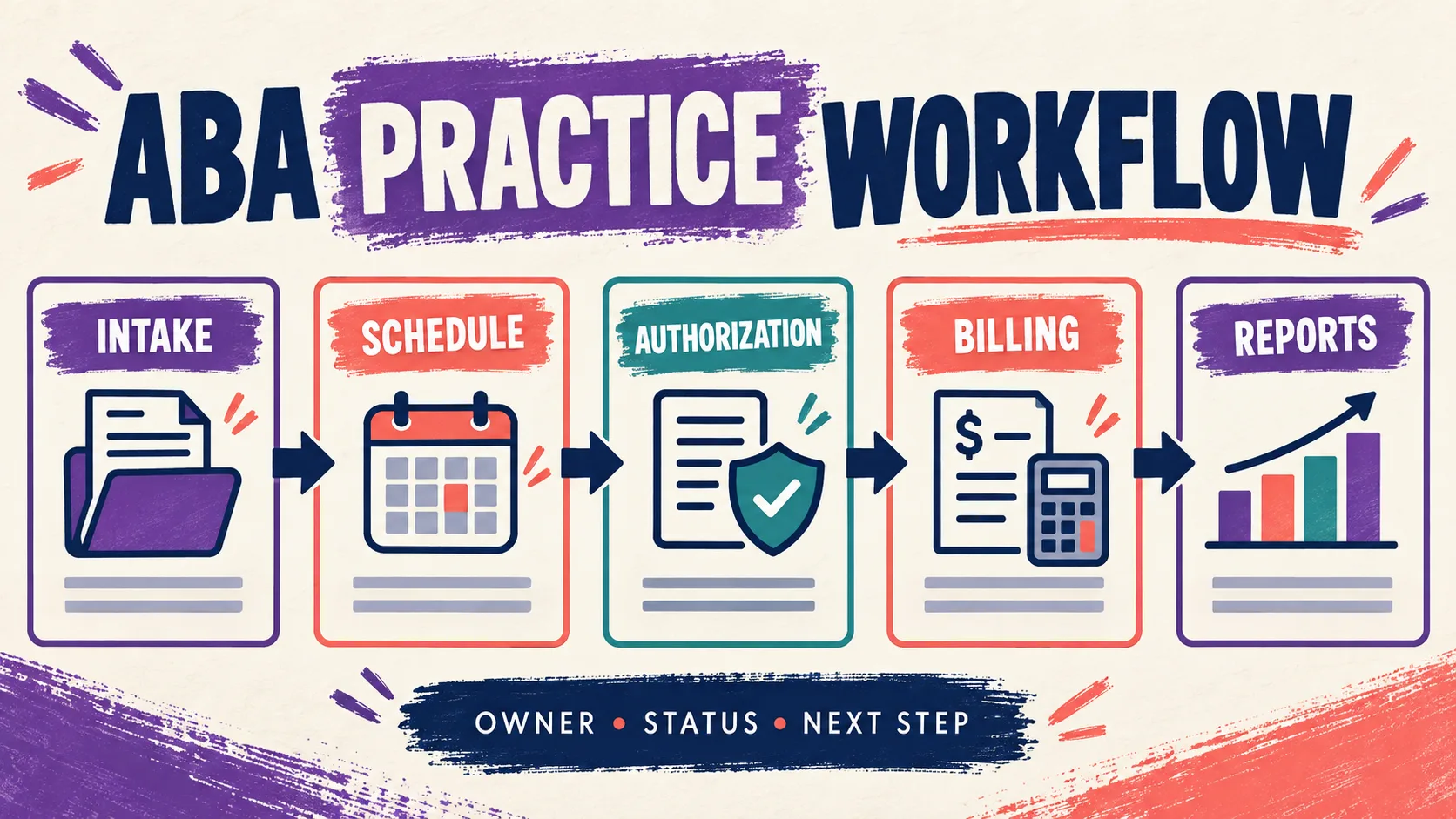
Map the journey from referral to discharge and identify every handoff. A good system should make ownership clear: who receives the referral, who verifies benefits, who requests or renews an authorization, who assigns staff, who confirms a visit, who checks a claim, and who reviews a report. If a task moves through email, spreadsheets, and several disconnected logins, the software may create more reconciliation work than it removes.
| Workflow | What to look for | Proof to request |
|---|---|---|
| Intake and referral | A clear owner, required information, duplicate detection, and status history | A test referral from intake to active case |
| Scheduling | Availability, recurring services, cancellations, conflicts, and location rules | A week with a cancellation and replacement visit |
| Authorizations | Units, dates, payer details, renewal alerts, and approval ownership | An expiring authorization and an amended approval |
| Billing workflow | Claim status, denials, corrections, payments, and reconciliation | A rejected claim followed through to resolution |
| Staff operations | Credentials, assignments, supervision reminders, and workload visibility | A role change and a supervisor review |
Which Features Matter for a Growing ABA Clinic?
Prioritize features by the risk they reduce. A feature that saves a few clicks is useful; a feature that prevents an authorization from expiring or makes a denial traceable may be much more valuable.
- Scheduling and capacity: Test recurring appointments, multiple locations, staff availability, cancellations, make-up visits, waitlists, and conflict alerts. Ask whether the calendar reflects the authorization rather than merely showing an open time.
- Authorizations and payer workflow: Confirm that the platform separates requested, approved, used, remaining, and expired units. The team should be able to see who owns the next action and what evidence supports the status.
- Billing and revenue cycle: Look for claim preparation, eligibility information, denial queues, corrected claims, payment posting, and aging reports. A billing screen should expose exceptions instead of hiding them in a single “processed” total.
- Workforce and supervision: Check credentials, onboarding, assignment history, time approvals, supervision reminders, and permissions. Software can organize documentation, but it cannot replace a qualified supervisor’s judgment or certify BACB fieldwork.
- Reporting and integrations: Ask whether reports preserve definitions and date ranges, whether exports are usable, and whether an integration fails loudly when data is missing. A dashboard that cannot be reconciled to source records is not a reliable control.
Also test the unglamorous paths: a staff member leaves, a payer changes a rule, a visit is entered late, a claim is denied, a client changes location, or the platform is unavailable. These scenarios reveal whether the system is a real operating tool or simply a polished directory of features.
How Can You Compare Vendors Without Falling for Feature Lists?
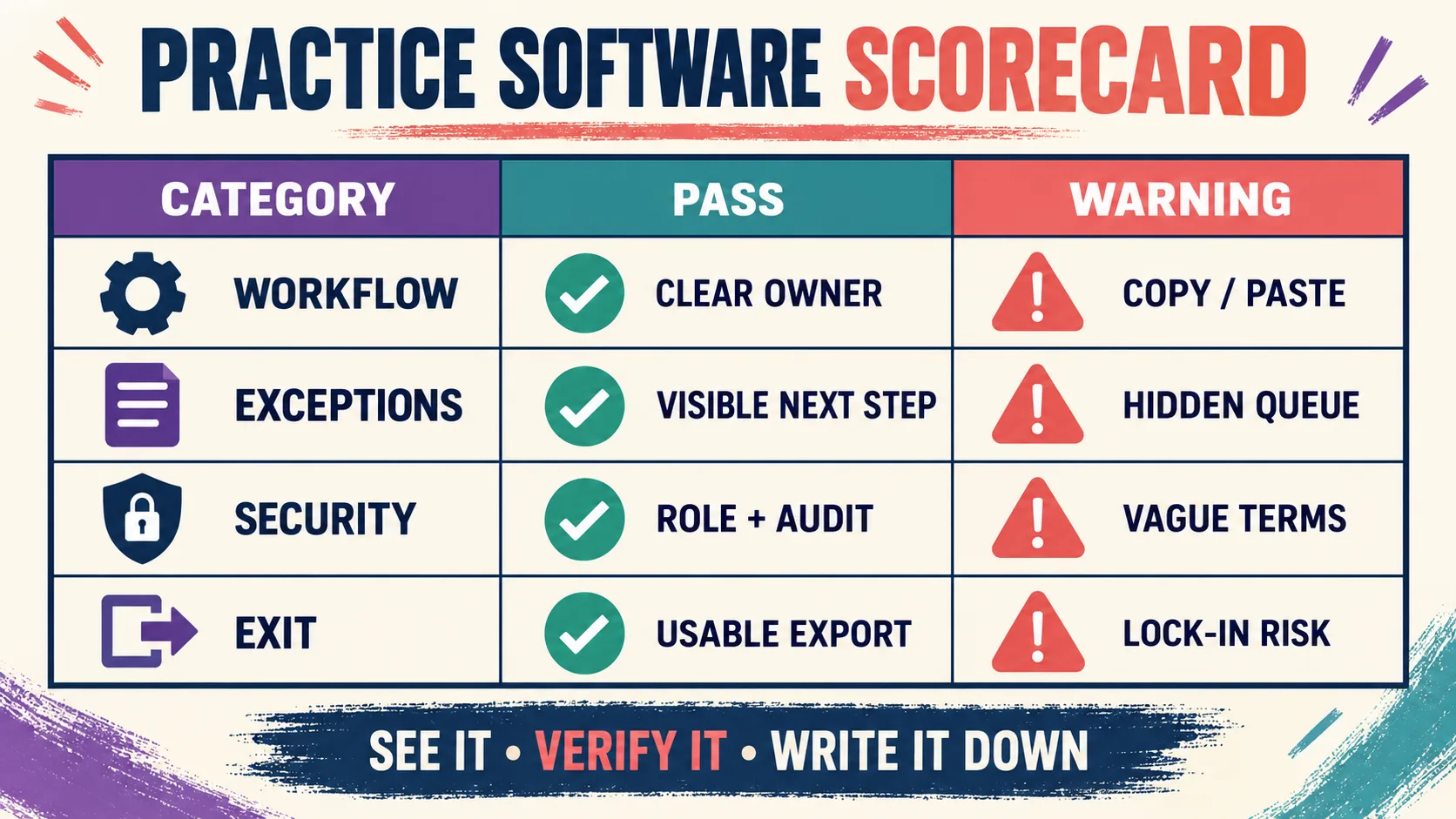
Give every vendor the same de-identified scenario and the same scorecard. Score what the platform demonstrates, not what a salesperson says it can do. Keep “shown live,” “confirmed in writing,” and “not verified” as separate columns. That distinction is especially important for integrations, exports, support response, data ownership, and contract terms.
| Category | Pass condition | Warning sign |
|---|---|---|
| Workflow fit | A referral can move through scheduling, authorization, service, and billing with clear ownership | Staff must copy the same information between unrelated screens |
| Exception control | Late visits, cancellations, denials, and expiring units create visible next actions | The system shows totals but not exceptions or responsibility |
| Data boundaries | Clinical, operational, financial, and administrative records have clear ownership | An all-in-one label hides what is actually stored or calculated |
| Exit and export | The clinic can retrieve usable records, history, and attachments | Export format, timing, and fees are vague |
Use weighted scores only after the minimum requirements are defined. A vendor that fails a non-negotiable security, authorization, or export requirement should not win because it scored well on convenience. Keep a short written decision record explaining which evidence was reviewed and which risks were accepted.
How Should You Estimate Total Cost?
Compare total cost of ownership, not only the monthly subscription. Include implementation, data migration, training, support tiers, additional users, locations, billing modules, integrations, payment processing, custom reports, storage, and export fees. Ask whether a price is per client, per user, per visit, per module, or based on revenue. A low entry price can become expensive when the workflow requires several add-ons.
Build a twelve-month scenario using your actual case count and staff roles. Add the cost of staff time spent correcting data, chasing denials, reconciling schedules, and answering support tickets. Request a written renewal policy and ask what happens to records if the clinic does not renew. Do not rely on a price shown in an older comparison article; verify the current quote and contract.
- Price model: Is the fee per client, user, visit, location, module, or claim?
- Implementation: Are migration, setup, training, and custom reports included or billed separately?
- Support: What response time, escalation path, and after-hours coverage are included?
- Exit: What data, attachments, audit history, and export help are included if you leave?
What Should You Ask About Privacy and Security?
If the platform creates, receives, maintains, or transmits protected health information, privacy and security review belongs in the buying process. The HHS Security Rule overview describes administrative, physical, and technical safeguard concepts. Ask the vendor to explain, in writing, role-based access, multi-factor authentication, encryption, audit logs, backups, incident response, subcontractors, support access, retention, and deletion.
The HHS business associate guidance is a useful starting point for understanding when a written agreement and permitted-use terms matter. A “HIPAA-ready” badge is not a substitute for reviewing the actual agreement, configuring access, training staff, and documenting your organization’s risk decisions. Involve the appropriate privacy or legal adviser when the facts require it.
Keep BACB obligations separate as well. The BACB fieldwork guidance places responsibility on candidates and supervisors; a software calculation does not certify qualifying fieldwork. Treat supervision records, credential checks, and reminders as operational aids that still require professional review.
What Should You Test in a Demo?
Send vendors the same short script before the demo. Ask them to use a de-identified case with a new referral, two staff members, one authorization, a recurring schedule, one cancellation, a denied claim, and a report. Then ask:
- Can the system show who owns the next step at every handoff?
- Can a manager see authorized, scheduled, delivered, billed, paid, and remaining units without manually rebuilding the numbers?
- What happens when a visit is late, corrected, cancelled, or entered after the authorization changes?
- Can a supervisor review staff activity without receiving permissions that expose unrelated client information?
- Can the clinic export records, audit history, attachments, and key identifiers in usable formats?
- Which answers are contractual, and which are only roadmap or sales statements?
Record the response and the evidence. If a feature cannot be shown or documented, mark it unverified. A calm, transparent answer about a limitation is often more useful than a vague promise that the platform can do everything.
How Do You Roll Out a New Platform?
Use a staged rollout. First, define the minimum workflow and clean the source data. Next, pilot one location or service line with de-identified scenarios. Compare schedules, authorization balances, billing outputs, reports, permissions, and exports against the old process before expanding. Write the downtime and correction procedure before staff need it.
- Owner: Name the operations lead, BCBA lead, billing lead, privacy contact, and vendor contact.
- Validation: Reconcile one case from referral through report and one exception from error through resolution.
- Training: Teach staff why required fields and handoffs exist, not only where to click.
- Review: At 30 and 90 days, inspect late entries, denied claims, schedule conflicts, access issues, and support response.
When your team is preparing for certification or supervision, the site’s free BCBA mock exam can support structured study practice. It is separate from software selection: a platform may organize work, but it does not replace the current BACB handbook, supervision requirements, privacy program, or clinical judgment.
ABA Practice Management Software FAQ
Is the best ABA practice management software always an all-in-one platform?: No. An all-in-one system can reduce logins and handoffs, but a specialized combination may provide a better clinical, billing, or scheduling fit. Compare the complete workflow, integration reliability, ownership of data, support model, and exit options rather than the number of modules on a product page.
Should a small ABA practice buy the same software as a multi-site provider?: Not necessarily. A small practice may prioritize simple scheduling, authorization visibility, clean billing, and easy exports. A multi-site provider may need complex permissions, location-level reporting, workforce planning, integrations, and stronger exception controls. The right requirement set grows from the practice’s risk and workflow.
What is the first question to ask a vendor?: Ask the vendor to follow one realistic case from intake through scheduling, authorization, service, billing, reporting, and export. Then ask what happens when the case goes off the normal path. That demonstration reveals more than a generic list of features.
Key Takeaway
The best ABA practice management software is the one your team can verify in a real workflow. Define the handoffs, separate operations from clinical data, test exceptions, calculate total cost, review privacy and export terms, and document the evidence behind the decision. A disciplined scorecard gives your clinic a more durable answer than a vendor ranking that may be out of date next year.
Take the Free BCBA Mock Exam
When you are ready to apply the idea, use the free practice resource below for additional feedback. Take the Free BCBA Mock Exam