
A BCBA hour tracker should show two different numbers without confusing them: the hours you logged and the hours that may qualify under the fieldwork rules that govern your application. People searching for a BCBA hour tracker often want a calculator, spreadsheet, or app that will tell them how close they are to certification. The more important question is what the number means. A tracker can record every hour, calculate monthly totals, and flag a possible issue. It cannot decide whether an activity qualifies or replace the responsible supervisor’s review.
Table of Contents
- BCBA Hour Tracker: Logged Hours vs Qualifying Hours
- Make Each Month Stand on Its Own
- Compare Supervised and Concentrated Fieldwork
- Choose the Correct 2022 or 2027 Rule Set
- Configure the Tracker for Review
- Choose the Tool After You Define the Controls
- Frequently Asked Questions
- Quick Review Checklist
- Take the Free BCBA Mock Exam
Start with the official 2027 BCBA requirements and the current BCBA Handbook. The rule set depends on your application timing and fieldwork type. This article gives you a clean way to configure a tracker and find questions early; it does not determine your individual eligibility.
BCBA Hour Tracker: Logged Hours vs Qualifying Hours
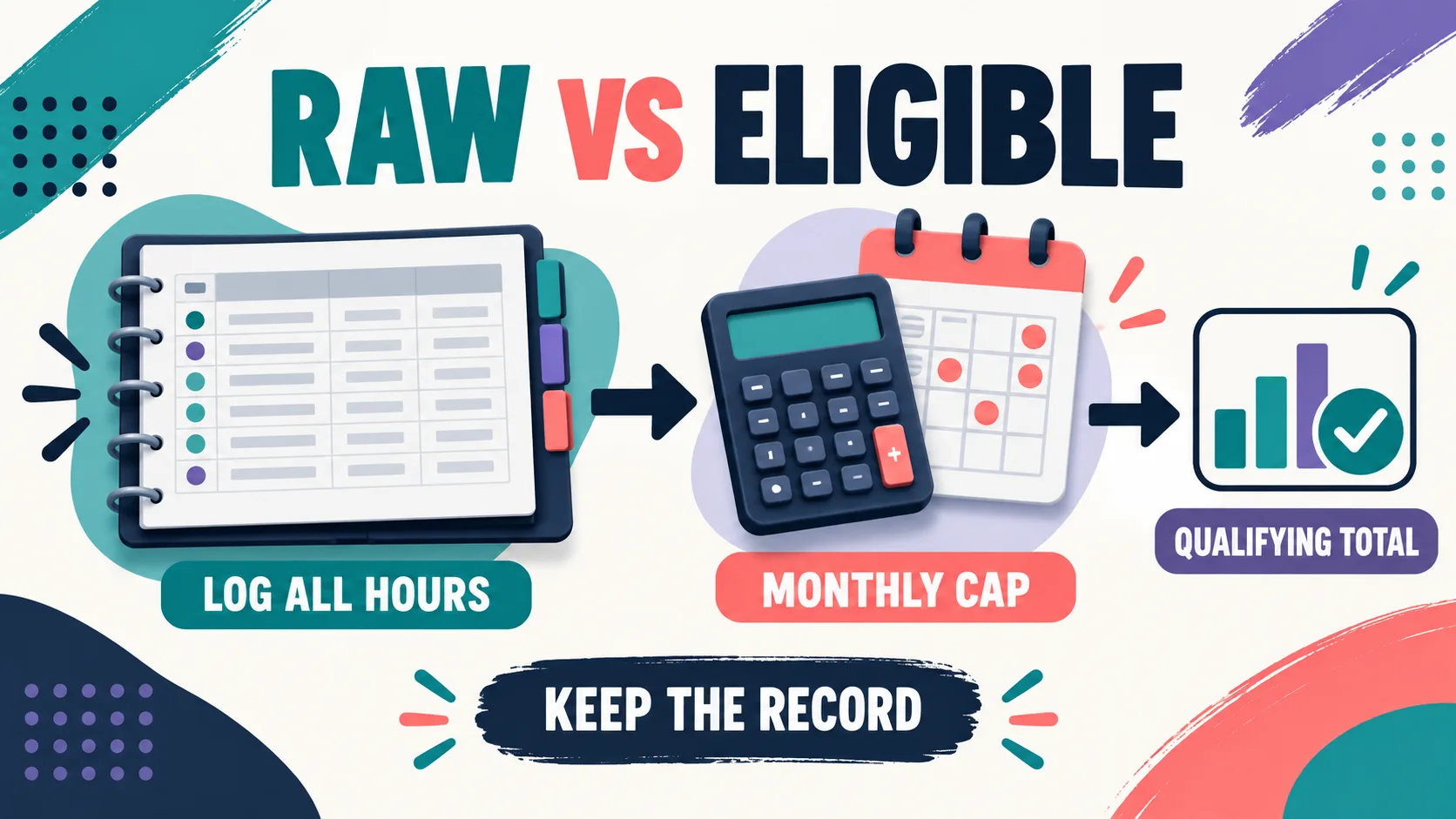
Use your tracker as a two-layer system. Layer one is the source record: every activity you performed, with a date, duration, setting, description, supervisor, and classification. Layer two is the eligibility view: the subset and totals that appear to meet the monthly and overall rules for the pathway and application date you are using.
Keeping those layers separate prevents a dangerous shortcut. If a month exceeds a limit or contains an unclear activity, do not delete the extra source row simply to make the dashboard look compliant. Keep the original entry, mark the issue, and let your supervisor confirm how the hours should be handled.
| Tracker view | What it answers | What it cannot decide |
|---|---|---|
| Raw logged hours | What did I do, when did I do it, and how long did it take? | Whether the activity meets every BACB requirement |
| Monthly eligible view | Which hours are included in the month’s calculations under the selected rule set? | Whether a supervisor or the BACB will accept an ambiguous entry |
| Overall progress | How much documented progress exists toward the pathway target? | Certification eligibility or an examination result |
The BACB’s fieldwork documentation guidance recommends that both the trainee and supervisor track the hours. That is why your tracker should be easy to review, not merely easy to fill in. If your supervisor cannot reconstruct the month from the source entries, a green progress bar is not enough.
Make Each Month Stand on Its Own
Under the 2027 overview, the monthly fieldwork checks include a minimum and maximum number of hours per supervisory period, a supervision percentage, observation time, unrestricted activity tracking, and limits on group supervision where applicable. A tracker should calculate these checks inside each month before it rolls the totals into an overall progress view.
Do not average a weak month together with a strong month and assume the overall percentage repairs it. The official rules and forms treat each organized fieldwork experience and supervisory period as a unit. When a month does not meet a requirement, stop and ask how the hours should be adjusted or documented; do not silently move them to another month.
| Monthly control | Tracker calculation | Review question |
|---|---|---|
| Total hours | Sum source entries by month, site, supervisor, and fieldwork type. | Are the hours inside the applicable minimum and maximum? |
| Supervision | Divide qualifying supervised hours by the month’s applicable total and retain the raw numerator and denominator. | Does the percentage meet the rule set selected for the application? |
| Observation | Add the minutes and preserve the date, setting, and supervisor for each observation. | Is the observation detail sufficient for the applicable form? |
| Unrestricted share | Track restricted and unrestricted source rows separately, then review the overall share. | Are you building the required balance across the experience, not just one good month? |
Label your month as ready for supervisor review only after the source rows, calculations, notes, and supporting files are present. A tracker warning is a question to resolve, not a final determination.
Compare Supervised and Concentrated Fieldwork
The 2027 BACB overview distinguishes Supervised Fieldwork from Concentrated Supervised Fieldwork. For applications under the 2027 requirements, the overview lists 2,000 total hours for Supervised Fieldwork and 1,500 for Concentrated Supervised Fieldwork. It also lists different supervision percentages and observation minutes. Configure the fieldwork type before entering data, but keep the raw entries detailed enough to review if the plan changes.
| 2027 overview item | Supervised Fieldwork | Concentrated Supervised Fieldwork |
|---|---|---|
| Total fieldwork hours | 2,000 | 1,500 |
| Supervision percentage | 5% per supervisory period | 7.5% per supervisory period |
| Client observation | 60 cumulative minutes per supervisory period | 90 cumulative minutes per supervisory period |
| Monthly range | 20–160 hours in the 2027 overview | 20–160 hours in the 2027 overview |
These are summary values, not the complete fieldwork requirements. The BACB directs applicants to the handbook for additional conditions. A good tracker displays which rule set and fieldwork type produced a calculation, so you can explain the number instead of trusting a hidden formula.
Choose the Correct 2022 or 2027 Rule Set
If your fieldwork crosses the transition, add three fields to your tracker: expected application date, requirement year, and form version. The BACB’s transition guidance specifically recommends tracking both observation contacts and duration when you need flexibility between the older and newer rules. That is a strong reason not to store only one calculated “observation met” checkbox.
Keep the source values even when the dashboard changes. For example, preserve the number of observations and the minutes for each observation, rather than replacing them with a single green status. Preserve monthly totals before and after any adjustment, and record who approved the adjustment.
Remember that the rules are tied to the application you submit. A tracker can help you plan, but it cannot choose your application date or guarantee that an older form will be accepted. Check the live BACB page and ask the responsible supervisor when the timeline is uncertain.
Configure the Tracker for Review

A practical tracker has a source-entry layer and a review layer. Use the source layer for individual activities. Use the review layer for monthly totals, warnings, and documents. Keep a simple change log so that a correction does not erase what was originally entered.
- Source columns: date, start or duration, setting, activity, restricted/unrestricted classification, supervised/independent classification, supervisor, observation minutes, and notes.
- Control columns: fieldwork type, requirement year, application target date, site, organized fieldwork experience, and form version.
- Review outputs: monthly total, supervision percentage, observation minutes, unrestricted share, group supervision view, and exceptions requiring review.
- Document links: supervision contract, monthly verification form, final form, supervisor correspondence, and dated export.
Do not let an automated tool hide uncertainty. A warning such as “observation incomplete” is useful because it creates a conversation. A green badge that cannot show the rows behind it is less useful when a supervisor or auditor asks for support.
Choose the Tool After You Define the Controls
Excel, Google Sheets, a fieldwork app, or a paper-plus-digital workflow can all support a BCBA hour tracker. Choose the simplest tool that lets you preserve source rows, show the formula, export the data, and share the review with your supervisor.
For an Excel starting point, see the existing BACB fieldwork tracker Excel guide. Review it against the current BACB sources and your supervisor’s process. If you use a platform, confirm the 2027 settings, export format, privacy controls, and who owns the records. After your fieldwork tracking is organized, keep examination preparation separate. The Free BCBA Mock Exam can help you review concepts, but a practice score does not validate hours or replace supervisor sign-off.
Frequently Asked Questions
What is the difference between logged and qualifying BCBA hours?: Logged hours are the activities you recorded. Qualifying hours are the hours that may meet the applicable BACB fieldwork requirements after classification, monthly checks, supervision, observation, documentation, and supervisor review. A tracker should show both views.
Can a BCBA hour tracker decide whether my hours count?: No. A tracker can calculate totals and flag possible issues, but it cannot replace the responsible supervisor’s review or the BACB’s evaluation of an application. Keep the source record and ask when an activity is unclear.
Should I keep hours over the monthly maximum in my tracker?: Keep the source record and clearly separate the raw total from the amount used in an eligibility calculation. Do not delete or silently move entries to make a dashboard look compliant. Ask your supervisor how the applicable rules treat the month.
What should I track for the 2027 observation change?: Preserve both the number of observation contacts and the duration in minutes, along with the date, setting, supervisor, and supporting notes. The BACB transition guidance recommends this detail when fieldwork spans the older and newer requirements.
Which BCBA hour tracker is best?: The best tracker is the one you will update accurately and your supervisor can review. Compare transparency, monthly calculations, raw-data export, version controls, privacy, and backup procedures instead of choosing by interface or the largest progress number.
Bottom line: Use a BCBA hour tracker to preserve every source entry, then calculate the applicable monthly and pathway view separately. Keep raw and eligible hours distinct, label the rule set, protect observation details, and let supervisor review—not a dashboard—decide what moves forward.
Quick Review Checklist
Use this final checklist to turn bcba hour tracker into exam-ready reasoning. The goal is not to memorize a label in isolation; it is to identify the relevant evidence and explain why the best answer fits the scenario. Key ideas to review:
- State the central definition or decision point for bcba hour tracker in your own words.
- Identify the detail that makes bcba hour tracker different from its closest related ABA term.
- Separate the observable facts in a scenario from assumptions that are not supported by the facts.
- Write one example and one nonexample so you can recognize the concept in a new setting.
Exam application checks:
- Ask what the question is actually requesting before comparing the answer choices.
- Mark the antecedent, response, consequence, or other evidence that supports the selected answer.
- Look for a distractor that describes a related process but does not answer the specific question.
Final self-check:
- Explain how you would verify the interpretation with clear observations or data.
- Change one detail in the scenario and decide whether your answer should change.
- Give a one-sentence rationale that a supervisor or study partner could evaluate.
Take the Free BCBA Mock Exam
When you are ready to apply the idea, use the free practice resource below for additional feedback. Take the Free BCBA Mock Exam