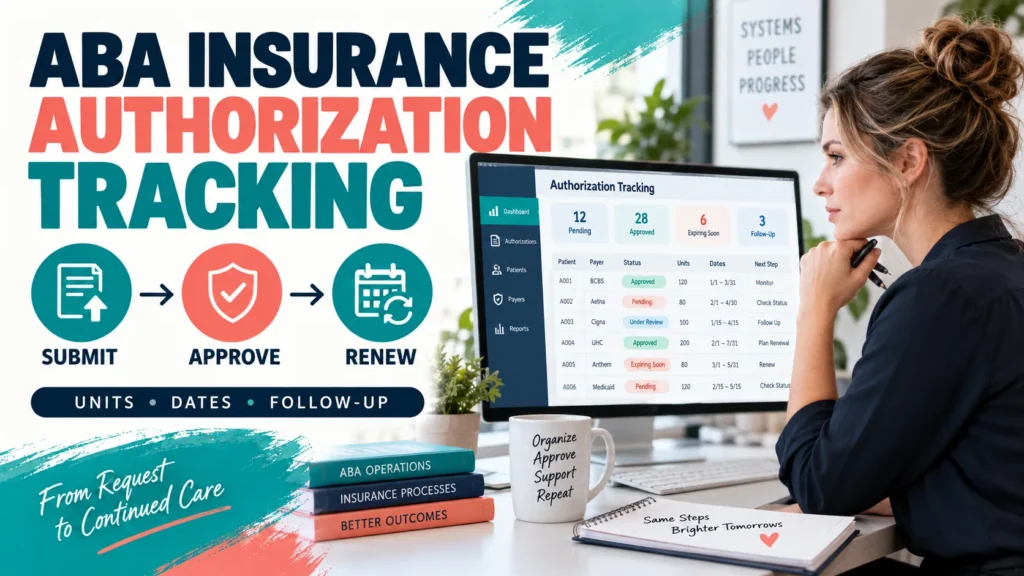
A provider-side workflow for tracking ABA authorization requests, payer responses, approved units, service dates, renewals, denials, and the next action that keeps a case from disappearing. If you searched for insurance authorization tracking ABA, you may not need another general explanation of insurance benefits. You need a dependable way to answer a more operational question: Where is each authorization request right now, what was approved, when does it end, who owns the next step, and what evidence supports the status?
Table of Contents
- What Insurance Authorization Tracking ABA Means
- The ABA Authorization Tracker Field Contract
- The Four-Stage Authorization Workflow
- Status Rules and Exception Ownership
- Weekly and Monthly Review Rhythm
- Privacy, Documentation, and Scope Boundaries
- Connect Tracking to Better Decisions
- Frequently Asked Questions
- Quick Review Checklist
- Take the Free BCBA Mock Exam
An authorization tracker is not a promise that a payer will approve services. It is a controlled record of requests, responses, dates, units, documents, and follow-up. Payer rules, codes, modifiers, medical-necessity criteria, service limits, and renewal windows vary by plan and contract. Verify the current requirement with the payer and the responsible clinical or billing professional.
Scope note: This is an educational operations guide, not insurance, billing, legal, clinical, or compliance advice for a particular client or practice. Use fictional identifiers in examples and follow your organization’s privacy, access-control, documentation, and escalation policies.
What Insurance Authorization Tracking ABA Means
ABA insurance authorization tracking is the practice of maintaining a current, reviewable record for each request for covered ABA services. The record follows the request from preparation and submission through payer response, approved service dates and units, delivery, renewal, denial follow-up, or closure.
This is different from checking a family’s insurance benefits. A benefit check asks what the plan appears to cover. Authorization tracking asks what happened to a specific request and what the practice must do next. The two workflows can link to one another, but they should not be collapsed into one vague “insurance status” field. At a minimum, the record should connect identity, request evidence, payer response, approved units and dates, risk flags, and one owned next action without requiring the team to open several unrelated systems.
The ABA Authorization Tracker Field Contract
Before choosing a spreadsheet, practice-management platform, or CRM, define what each field means. A label such as “approved” is not enough if one team member means “the payer verbally said yes” and another means “written approval with dates and units is stored.” The field contract creates a shared definition and makes handoffs safer.
| Tracker field | What to record | Why it matters |
|---|---|---|
| Identity and scope | Internal client ID, payer/plan, provider or location, request type, service code or code family, and responsible role. | Prevents two similar requests from being merged and limits confusion during handoff. |
| Request record | Submission date, channel, payer reference number, requested units, requested dates, attachments, and submission confirmation. | Shows what was actually requested and creates an evidence trail if the status is disputed. |
| Decision record | Pending, approved, partially approved, denied, withdrawn, or closed; response date; notice location; approved units; effective and end dates; conditions. | Separates a payer decision from a phone note and keeps billing and scheduling aligned with written terms. |
| Risk and next action | Remaining units, days to end date, renewal lead date, missing item, assigned owner, due date, next action, and last verified timestamp. | Turns a passive status into an owned task before care or claims are disrupted. |
| Closure and audit | Closure reason, final document location, unresolved issue, reviewer, and change history. | Makes it possible to learn from denials and correct records without silently overwriting history. |
Use an internal identifier rather than a full name in the operational view whenever the full identity is not necessary. If a staff member must open a clinical or payer document, the tracker should point to the approved location instead of becoming a second uncontrolled repository.
The Four-Stage Authorization Workflow
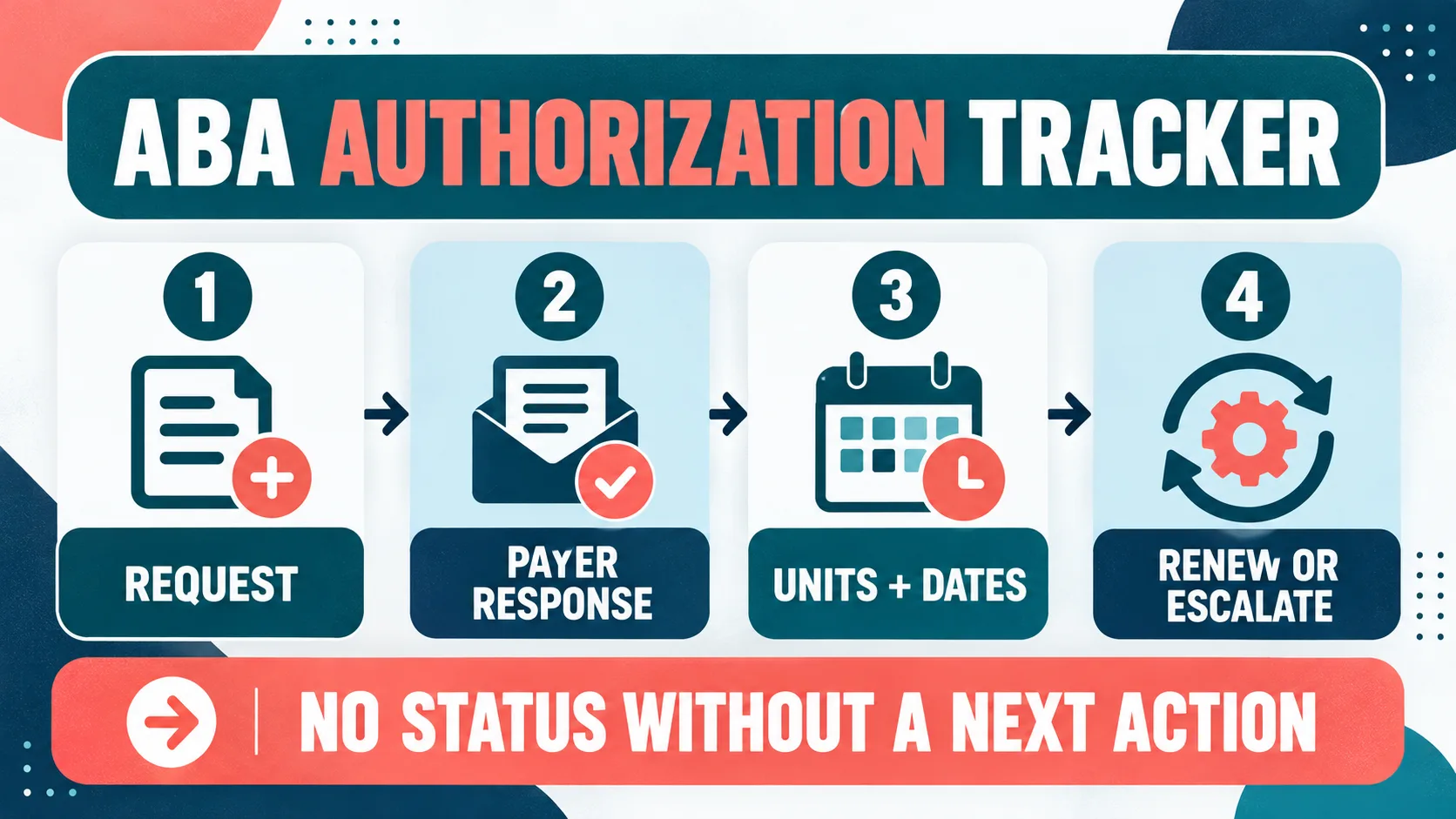
The lifecycle is easier to manage when every record moves through the same four stages. The stages are not payer rules; they are practice-control points. 1. Request: define the submission before sending it: Confirm the request type, service dates, requested units, code or code family, rendering and billing roles, clinical documentation, and submission channel. Record the internal reviewer and the date submitted. If an item is missing, use a visible “missing documents” status instead of submitting a record that looks complete.
2. Payer response: distinguish pending from approved: Save the payer reference number and the response source. A voicemail, portal message, fax, and formal notice do not necessarily carry the same evidentiary weight. Record the response date and link to the permitted document location. If the payer says the request is still under review, keep it pending with a due date and a named follow-up owner.
3. Units and dates: reconcile the decision to delivery: For an approved request, enter the approved units, effective date, end date, service codes, modifiers or conditions that matter to operations, and any utilization instructions. Compare the authorization record with scheduling and billing data. “Approved” does not mean every scheduled service is automatically billable, clinically appropriate, or within the authorized dates.
4. Renew or escalate: act before the record becomes urgent: Set an internal renewal lead date based on the payer’s instructions, the practice’s workload, and the time needed to collect current documentation. Do not invent one universal number of days. If the response is delayed, units are running low, a denial arrives, or dates do not match, assign an escalation path and document the attempted contact, question, response, and next review date. A fictional record still needs a clear owner and next action.
Status Rules and Exception Ownership
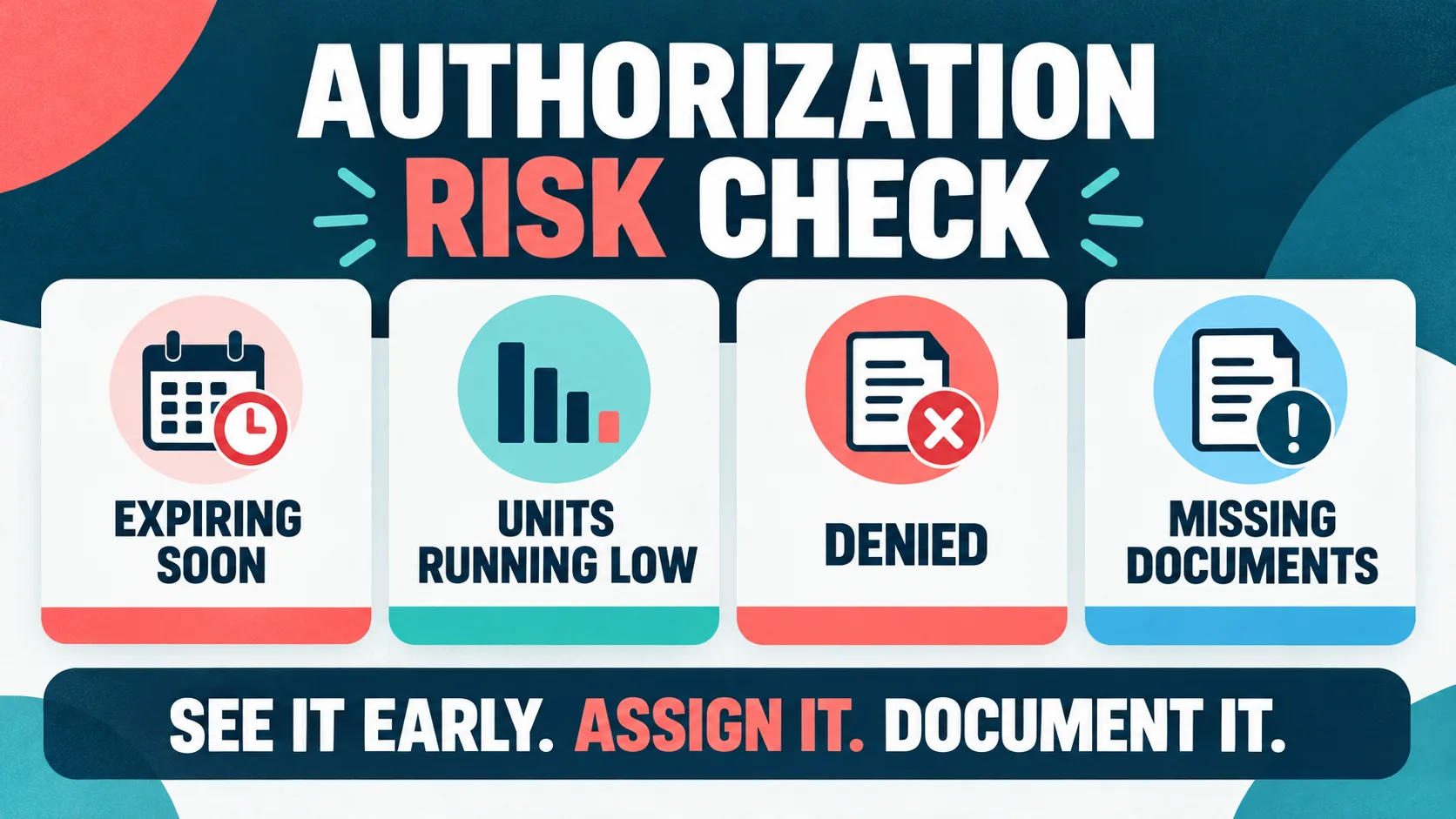
Statuses should describe the next operational condition, not merely the color of a dashboard tile. Give each status an entry rule, an owner, a due date, and an exit rule. This keeps a case from staying “pending” for weeks without anyone being accountable.
| Status or risk | Required next action | Exit evidence |
|---|---|---|
| Pending | Verify the payer’s stated review time, check for a portal or fax message, and contact the payer or assigned channel by the due date. | Dated response, reference number, or documented escalation—not simply “someone called.” |
| Expiring soon | Check remaining units, requested continuation, current clinical documentation, and the payer’s renewal process. | Renewal submitted or a documented decision that services are closing, changing, or being reviewed. |
| Units running low | Reconcile delivered, scheduled, and remaining authorized units; ask the responsible clinical and billing roles whether a review is needed. | Reconciled count plus a documented plan for the remaining dates and units. |
| Denied | Save the notice, identify the stated reason and deadline, assign the appeal or correction owner, and confirm what services can proceed under current authorization. | Corrected submission, appeal decision, payer clarification, or documented closure with responsible review. |
| Missing documents | Name the missing item, request it from the correct role, set a due date, and avoid marking the request ready until the item is verified. | Document received, reviewed, submitted, and linked to the request record. |
A simple escalation rule is stronger than a complicated color system: every open record must have one owner, one next action, one due date, and one source of truth. If more than one person contributes, name the accountable owner and list the supporting role separately.
Weekly and Monthly Review Rhythm
A short weekly authorization huddle should focus on exceptions: requests without a response, dates approaching an internal renewal lead date, units that do not reconcile, new denials, and records waiting on a document. The goal is not to read every row aloud. It is to remove the next blocker and document ownership.
| Review | Review first | Document before closing |
|---|---|---|
| Weekly exceptions | Pending, denied, expiring, low-unit, and missing-document records. | Owner, due date, payer reference, attempted action, and next check. |
| Monthly aging | Age from submission to response, renewal lead-time patterns, payer or code concentrations, and unresolved denials. | Definition version, data-quality caveat, pattern owner, and process change if one is approved. |
| Quarterly control review | Whether fields, roles, access permissions, payer instructions, and escalation paths still match current operations. | Updated field contract, approved owner list, and retained change history. |
Review fictional counts such as open requests with next actions, records waiting on documents, and records within the renewal window. These counts show work to assign; they do not promise payer response times or universal performance. For broader practice context, the existing ABA practice KPI guide explains how to pair authorization utilization with clinical, access, staffing, and revenue-cycle measures.
Privacy, Documentation, and Scope Boundaries
Authorization records can contain protected health information, payer identifiers, clinical documents, and dates that affect care. Review the current HHS HIPAA professional resources and your organization’s policies for access, transmission, retention, and incident response. Apply minimum-necessary thinking: show each role the fields needed for its task, keep documents in the approved system, and do not paste identifiable information into an unapproved spreadsheet, chat, or AI tool.
Professional judgment matters too. The BACB Ethics Code resources are an official place to review current ethics materials and responsibilities. A tracker can surface a missing document or an approaching date; it cannot decide medical necessity, client fit, treatment changes, or whether a claim is permissible. Escalate clinical, ethical, legal, and payer-contract questions to the qualified role responsible for them.
Keep a change history. If an approved unit count or end date is corrected, record who changed it, why, what source was used, and when the change was verified. Silent overwrites make later reconciliation difficult and can cause a scheduler, clinician, or biller to act on an obsolete status.
Connect Tracking to Better Decisions
A strong authorization tracker is intentionally simple: define the request, save the evidence, separate pending from approved, reconcile units and dates, assign the next action, and review exceptions on a predictable rhythm. Start with the fields your team can verify consistently. Add automation only after the underlying definitions and ownership rules are stable.
For the family-facing side of the process, use the existing ABA health insurance guide to structure questions about benefits, network status, authorization, and costs. For BCBA exam preparation, use the Free BCBA Mock Exam as a separate study checkpoint. A mock-exam result is study data, not an official BACB score and not an authorization or billing benchmark.
Frequently Asked Questions
What should an ABA insurance authorization tracker include?: At minimum, record an internal client ID, payer and plan, request type, services and dates requested, units requested, submission date and channel, payer reference, response status, approved or denied terms, document location, owner, next action, due date, and last verified time.
Is authorization tracking the same as verifying ABA insurance benefits?: No. Benefit verification describes what a plan may cover. Authorization tracking follows a particular request and records the payer response, approved units, dates, conditions, evidence, and next action. Link the workflows, but keep their purposes distinct.
How early should an ABA authorization renewal be submitted?: There is no universal number of days. Follow the payer’s current instruction and allow time for documentation, review, corrections, and internal handoffs. Record the practice’s lead date and the source for it rather than inventing a generic deadline.
What should happen when an ABA authorization is denied?: Save the notice, identify the stated reason and any response deadline, assign the qualified appeal or correction owner, verify what services are currently authorized, and document each follow-up. Do not treat a denial as a reason to silently change clinical or billing records.
Should authorization records contain full client names?: Only when the role and task require them and your approved system permits it. Use internal identifiers in operational views when possible, restrict access, store clinical documents in the approved location, and follow your organization’s HIPAA and retention policies.
Bottom line: ABA insurance authorization tracking works when every request has a clear scope, evidence-backed status, reconciled units and dates, one accountable owner, and a documented next action. Treat the tracker as an operational control—not a payer promise—and review it alongside clinical, access, people, and revenue context. For targeted review, use our insurance authorization tracking aba practice questions to apply the concept in exam-style scenarios.
Quick Review Checklist
Use this final checklist to turn insurance authorization tracking aba into exam-ready reasoning. The goal is not to memorize a label in isolation; it is to identify the relevant evidence and explain why the best answer fits the scenario. Key ideas to review:
- State the central definition or decision point for insurance authorization tracking aba in your own words.
- Identify the detail that makes insurance authorization tracking aba different from its closest related ABA term.
- Separate the observable facts in a scenario from assumptions that are not supported by the facts.
- Write one example and one nonexample so you can recognize the concept in a new setting.
Exam application checks:
- Ask what the question is actually requesting before comparing the answer choices.
- Mark the antecedent, response, consequence, or other evidence that supports the selected answer.
- Look for a distractor that describes a related process but does not answer the specific question.
Final self-check:
- Explain how you would verify the interpretation with clear observations or data.
- Change one detail in the scenario and decide whether your answer should change.
- Give a one-sentence rationale that a supervisor or study partner could evaluate.
Take the Free BCBA Mock Exam
When you are ready to apply the idea, use the free practice resource below for additional feedback. Take the Free BCBA Mock Exam