
BCBA supervision and analysis data platforms are software tools that help behavior analysts collect session data, organize supervision records, review graphs, and keep clinical documentation connected. They do not replace the BCBA’s clinical judgment, the BACB handbook, a supervision contract, or a payer’s documentation rules. The right platform depends on whether you need fieldwork tracking, direct ABA data collection, clinical analysis, team supervision, practice management, or several of those functions together.
Table of Contents
- BCBA supervision and analysis data platforms: the short answer
- What should a BCBA platform actually support?
- Which type of platform fits your workflow?
- How do popular platform categories compare?
- Can software make supervision BACB-compliant?
- What should you ask before choosing?
- Common platform-selection mistakes
- How does platform knowledge help BCBA exam study?
- BCBA platform FAQ
- Take the Free BCBA Mock Exam
A useful comparison starts with the workflow rather than the brand name. First define who enters the data, what the BCBA must review, which reports must be exported, and what evidence must be retained. Then test whether the platform supports those tasks without creating a second spreadsheet or a disconnected note system. Table of Contents
BCBA supervision and analysis data platforms: the short answer
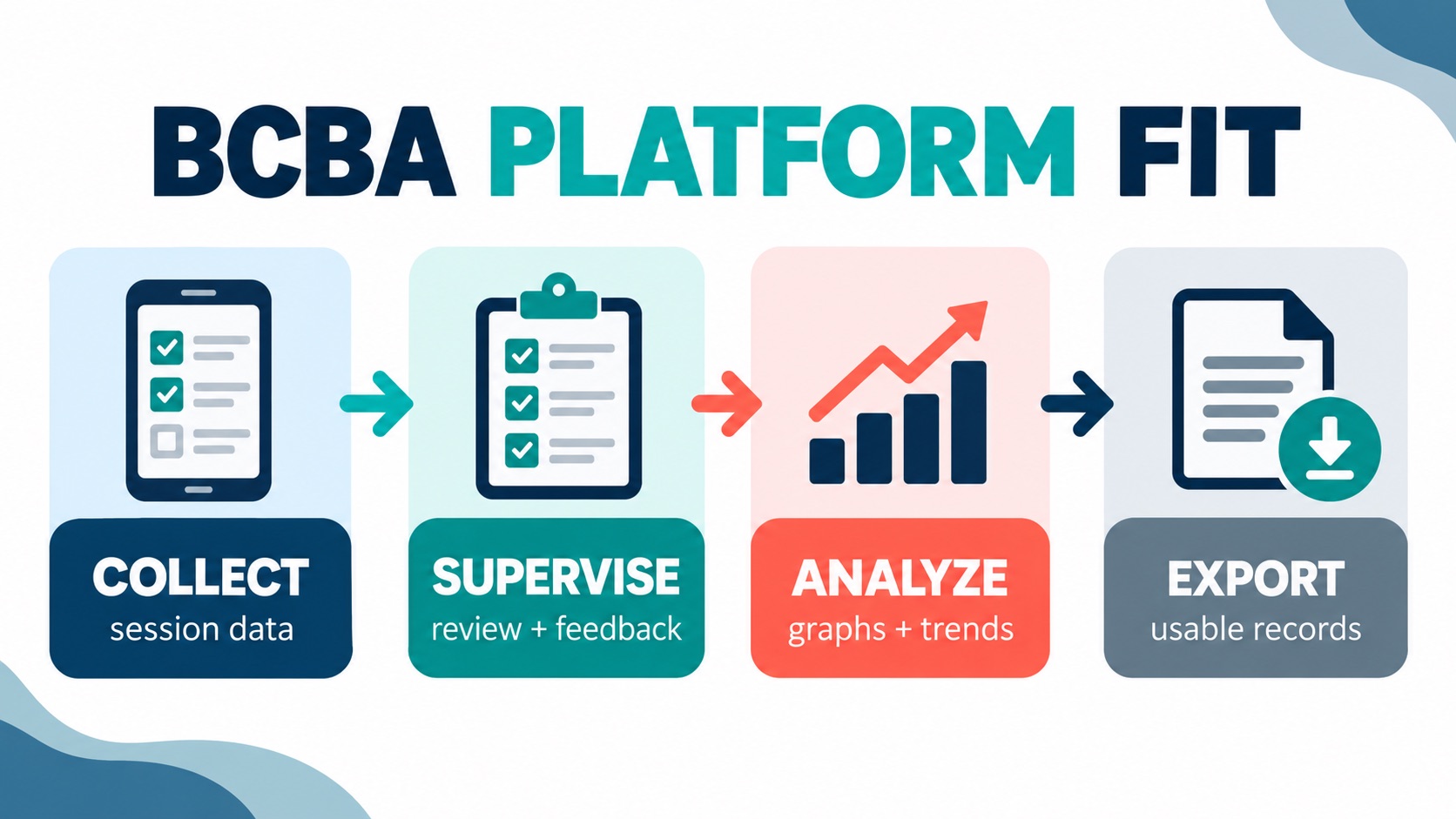
There is no single best platform for every BCBA. A solo supervisor tracking supervisee hours needs a different tool from a clinic collecting trial-by-trial data for dozens of clients. A school team may prioritize simple data entry and export, while a multi-location provider may need permissions, scheduling, authorizations, billing connections, and an audit trail. Use this five-part fit test before comparing prices or signing a contract. Score the candidate tool against the whole loop, because a platform that solves only one step may create extra reconciliation work elsewhere.
- Collect: Can the frontline user record the right measurement during the session?
- Connect: Can the BCBA see the target, program, context, and implementation history together?
- Analyze: Can the system display useful trends, phase changes, and summaries without hiding the raw data?
- Supervise: Can the supervisor review performance, give feedback, and retain evidence of the supervision activity?
- Export: Can you retrieve readable records if an insurer, school, client, supervisor, or auditor needs them?
If a platform passes only the data-entry test, it may be a good collection app but not a complete supervision system. If it promises every function but makes sessions slow or exports unclear, the feature list may be more impressive than the actual workflow.
What should a BCBA platform actually support?
Start by writing the workflow in plain language. For example: the BCBA defines a target and measurement method; the RBT records data; the platform graphs the result; the BCBA reviews context and implementation; the team documents the decision; and the record can be exported. The product should make that chain visible. Important capabilities include the items below. The exact priority depends on the caseload, setting, and people who will use the system every day:
- Flexible measurement: frequency, duration, latency, interval recording, percentage correct, task analysis, ABC data, or other methods that fit the program.
- Supervisor-controlled targets: clear instructions, mastery criteria, prompt definitions, and version history.
- Near-real-time review: the BCBA can identify missing or unusual data before the next clinical decision.
- Graphs and analysis: trend displays, phase changes, annotations, and raw-data access rather than a single opaque score.
- Supervision evidence: review notes, feedback, observation records, trainee goals, and timestamps where appropriate.
- Role permissions: different access for BCBAs, RBTs, trainees, caregivers, administrators, and school staff.
- Reliable export: PDF, CSV, or other usable formats with dates, credentials, notes, and data definitions.
- Security and agreements: understand the vendor’s privacy, access-control, retention, breach-response, and business-associate documentation before entering protected information.
Do not assume that “analytics” means the same thing across vendors. One product may mean simple trend lines, another may mean automated report generation, and another may mean operational dashboards. Ask to see a real export from a realistic case, not only a marketing screenshot.
Which type of platform fits your workflow?
Most tools fall into overlapping categories. Classifying the primary job makes the comparison easier, especially when two vendors use different names for similar features or bundle clinical and administrative functions together.
| Platform category | Best starting use | Main question before buying |
|---|---|---|
| Fieldwork and supervision tracker | Trainee hours, meetings, feedback, goals, and forms | Does it support the current and future documentation version I need? |
| ABA data collection app | Fast session entry, graphs, and progress reports | Can users record accurately when the session is busy or offline? |
| Clinical or ABA EMR | Programs, notes, authorizations, scheduling, and records | Does the analysis remain usable, or is it buried in administration? |
| Practice-management layer | Caseload, staff, locations, billing, and operations | Can it integrate with clinical data without duplicating entry? |
Some vendors combine categories. CliniScripts, for example, describes a workflow connecting programs and targets, ABA data collection, supervision review, AI-assisted notes, scheduling, and practice operations. TallyFlex positions itself more narrowly around ABA data collection, session review, graphs, reports, and multiple recording methods. Those descriptions come from the vendors’ own pages, so treat them as feature claims to verify in a trial, not as independent performance ratings.
How do popular platform categories compare?
A practical comparison should focus on the job-to-be-done rather than the number of icons in a dashboard. Ask who benefits from each feature and what record it is supposed to improve:
- For a solo BCBA: prioritize low setup effort, mobile access, export, client limits, and whether a single user can configure programs without paying for unused clinic features.
- For a supervisor with trainees: prioritize hour tracking, supervision contacts, observation records, feedback history, form support, and a clear way to distinguish trainee documentation from client clinical records.
- For an RBT-led clinic: prioritize one-tap data entry, offline behavior, clear program instructions, role permissions, and review queues for missing or inconsistent data.
- For a school team: prioritize accessibility, school-friendly exports, staff roles, data-sharing boundaries, and whether the platform supports the team’s education documentation process.
- For a growing organization: prioritize multi-location controls, audit trails, integrations, authorization workflows, staff onboarding, and data portability if the vendor relationship ends.
Look for evidence of fit in a live demonstration. Ask the vendor to create one target, collect a small sample, graph it, annotate a change, document a supervision review, and export the complete record. If the demonstration skips the hard parts, you have not tested the workflow yet.
Can software make supervision BACB-compliant?
No. The BACB supervision and training resources say supervisors must review the relevant handbook requirements, and they identify supervision of future behavior analysts, RBTs, and BCaBAs as roles with specific responsibilities. The BACB also states that supervisors who oversee fieldwork trainees or certain ongoing supervision must complete the required 8-hour supervision training before providing supervision.
A platform can help organize evidence, but it cannot decide whether an activity qualifies, whether a supervisor is eligible, whether a client observation meets the rule, or whether the monthly percentage is correct. The person responsible for supervision still has to make the professional decision, review the record, correct errors, and sign or attest where required. Use software as a control system, not as a substitute for professional responsibility. The following habits help a platform support supervision without pretending to make the clinical decision:
- Configure the current fieldwork or service rules before the first record is created.
- Keep the data definition beside the graph so a future reviewer knows what was measured.
- Record the context for a change instead of relying only on a trend line.
- Review permissions so trainees and technicians cannot silently rewrite signed supervision evidence.
- Export and back up records according to the applicable policy, contract, and legal requirements.
What should you ask before choosing?
Take this question list to a product demo and ask the vendor to answer with a live workflow whenever possible. Written answers are useful, but a realistic demonstration reveals where users must switch screens or rebuild information manually:
- Which recording methods and data definitions are supported?
- Can a BCBA configure a target without vendor intervention?
- Can the user work offline, and how does the system handle sync conflicts?
- Can the BCBA see raw data, graphs, notes, and implementation context in one review?
- What does the audit trail record when someone edits a note or data point?
- Can the system separate clinical records, supervision records, and administrative records?
- What are the export formats, retention rules, and data-deletion process?
- What security documentation and business-associate agreement options are available?
- What happens to the data if the subscription ends?
- Which features are included in the price, and which require an upgrade or integration?
Common platform-selection mistakes
- Buying the longest feature list: a complex platform can slow down data collection and reduce adoption.
- Confusing graphs with analysis: a graph displays data; the BCBA still interprets it in context.
- Assuming vendor language is certification guidance: compare the product with the current BACB handbook and payer rules.
- Skipping an export test: a beautiful dashboard is not enough if you cannot produce a complete, readable record.
- Ignoring offline conditions: a clinic with unreliable connectivity needs a tested offline workflow, not a promise on a sales page.
- Putting all records in one permission level: role-based access protects clinical review and supervision evidence.
How does platform knowledge help BCBA exam study?
Platform questions are useful because they connect abstract measurement and supervision concepts to a real workflow. Practice identifying which measurement method fits a target, which graph answers a decision question, what data a supervisor needs to review, and which task belongs to the BCBA rather than the software.
After reviewing the relevant BACB supervision and measurement concepts, use the free BCBA mock exam to practice under time pressure. When you miss a question, label it as a measurement error, graph-interpretation error, supervision-documentation error, or role-boundary error. The mock exam is study support; it does not certify a platform, replace supervision, or guarantee a passing score.
BCBA platform FAQ
What is a BCBA supervision platform?: It is software that helps organize supervision activities such as trainee goals, meetings, feedback, observations, hours, and documentation. The exact features vary, and a supervision tracker may not include clinical ABA data collection or practice-management functions.
Is a data collection app the same as an ABA analysis platform?: Not necessarily. A data collection app may capture frequency, duration, ABC, or other measurements and display basic graphs. An analysis platform may add richer review, annotations, program decisions, and reporting. Test the full workflow instead of relying on labels.
Can a platform replace a BCBA supervisor?: No. Software can store information and make patterns easier to see, but a qualified BCBA remains responsible for clinical judgment, supervision, ethical practice, and applicable documentation. A dashboard cannot validate an activity or sign a required attestation.
What is the first feature to test?: Test the complete loop: configure one target, collect realistic data, review the graph, document the decision, and export the record. If that loop is slow or unclear, additional features will not solve the core problem.
The best BCBA supervision and analysis data platforms are the ones that make accurate collection, meaningful review, responsible supervision, and usable documentation easier for the actual people doing the work. Start with the workflow, verify the vendor’s claims, compare the export and security details, and keep the BACB requirements outside the software as the authoritative standard.
Take the Free BCBA Mock Exam
When you are ready to apply the idea, use the free practice resource below for additional feedback. Take the Free BCBA Mock Exam