
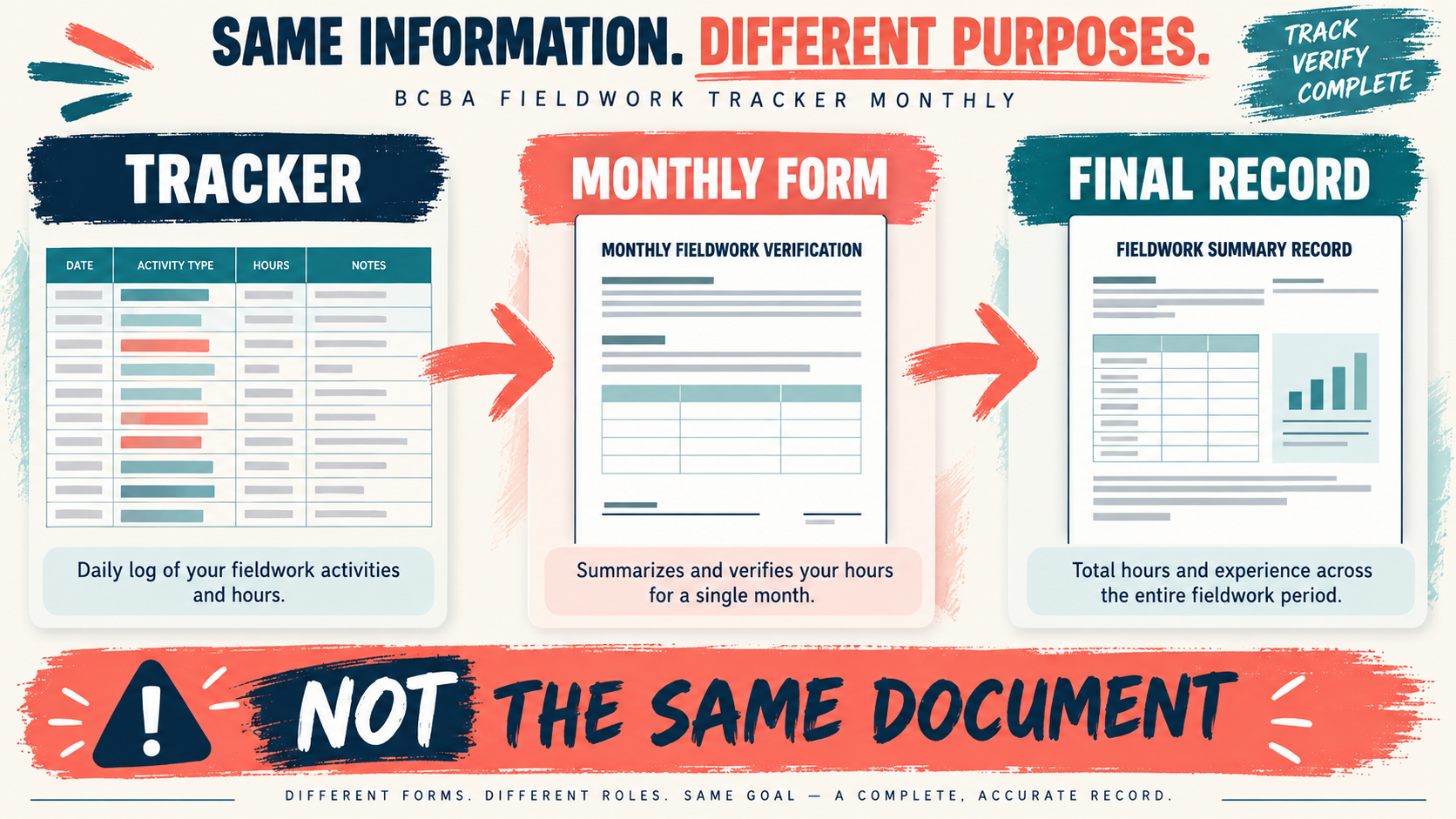
A BACB fieldwork tracker monthly system is the bridge between daily notes and the form that closes each supervisory period. It should help you collect the month’s source entries, reconcile the totals, identify gaps, and prepare a clean review with your supervisor. It is not the same document as the Monthly Fieldwork Verification Form, and a dashboard total is not a signature.
Table of Contents
- In This Guide
- BACB Fieldwork Tracker Monthly: What It Should Accomplish
- How to Move From Daily Source Entries to a Monthly Summary
- A Four-Step Month-End Review Workflow
- How the Tracker Relates to Monthly and Final Verification Forms
- How to Handle Multiple Supervisors and Partial Months
- How to Control Requirement and Form Versions
- Common Monthly Tracking Mistakes
- Frequently Asked Questions
- Take the Free BCBA Mock Exam
The current BACB fieldwork resources require candidates to maintain an ongoing documentation system and use the applicable verification forms. The exact form version and requirement edition matter, especially during the 2022-to-2027 transition. Start with the current BACB BCBA fieldwork resources before copying a monthly tracker or relying on a template.
In This Guide
BACB Fieldwork Tracker Monthly: What It Should Accomplish
A monthly tracker should make the month reviewable. It should show which dates and activities produced the total, how supervision and observation were documented, what still needs an explanation, and whether the official form is ready for review. It should not hide source rows behind a single progress bar.
| Item | Monthly tracker role | Separate requirement |
|---|---|---|
| Daily source record | Captures dates, durations, activities, supervision, and context as work occurs. | Must be accurate, sufficiently detailed, and stored securely. |
| Monthly summary | Adds the source records and highlights missing fields or possible exceptions. | Totals must be reconciled with the applicable requirement edition. |
| Monthly verification form | Receives the reviewed monthly numbers and signatures. | Use the current BACB form for the structure and requirement edition that apply. |
| Final verification form | Uses the completed record to close an organized fieldwork experience. | Cannot repair missing monthly evidence or make unsupported totals valid. |
If a template calls itself a “monthly BACB form,” inspect it carefully. The BACB Documenting Fieldwork Hours resource describes the documentation system and the role of Monthly and Final Fieldwork Verification Forms; a third-party tracker may be useful, but its title does not make it an official document.
How to Move From Daily Source Entries to a Monthly Summary
Build the month from row-level records. Whether you use Excel, Google Sheets, or another approved system, keep the source table separate from the monthly dashboard. The summary should be calculated from the source table, not typed over to match a form.
Capture the fields that explain the total: Each entry should make it possible to answer when the activity happened, how long it lasted, what kind of fieldwork it was, which activity category was used, and who supervised or reviewed it when applicable. Supervision contacts need enough context to show what occurred and what feedback was provided. Observation entries should identify the setting and supervisor without adding unnecessary client information. A monthly source review should look for:
- Blank dates, durations, supervisor names, or activity categories
- Duplicate sessions, overlapping times, or entries copied into the wrong month
- Activities that need a supervisor’s classification decision
- Supervision contacts, observations, and feedback that are not linked to the period
- Changes made after a prior review that need a dated correction note
Keep calculation and judgment separate: A formula can add hours and show a percentage. It cannot determine whether the activity was appropriate, whether the supervisor was qualified for that arrangement, or whether a note is sufficient. Put a visible “manual review” or “question for supervisor” flag beside the automated checks. This makes the tracker more honest and gives the month-end conversation a starting point.
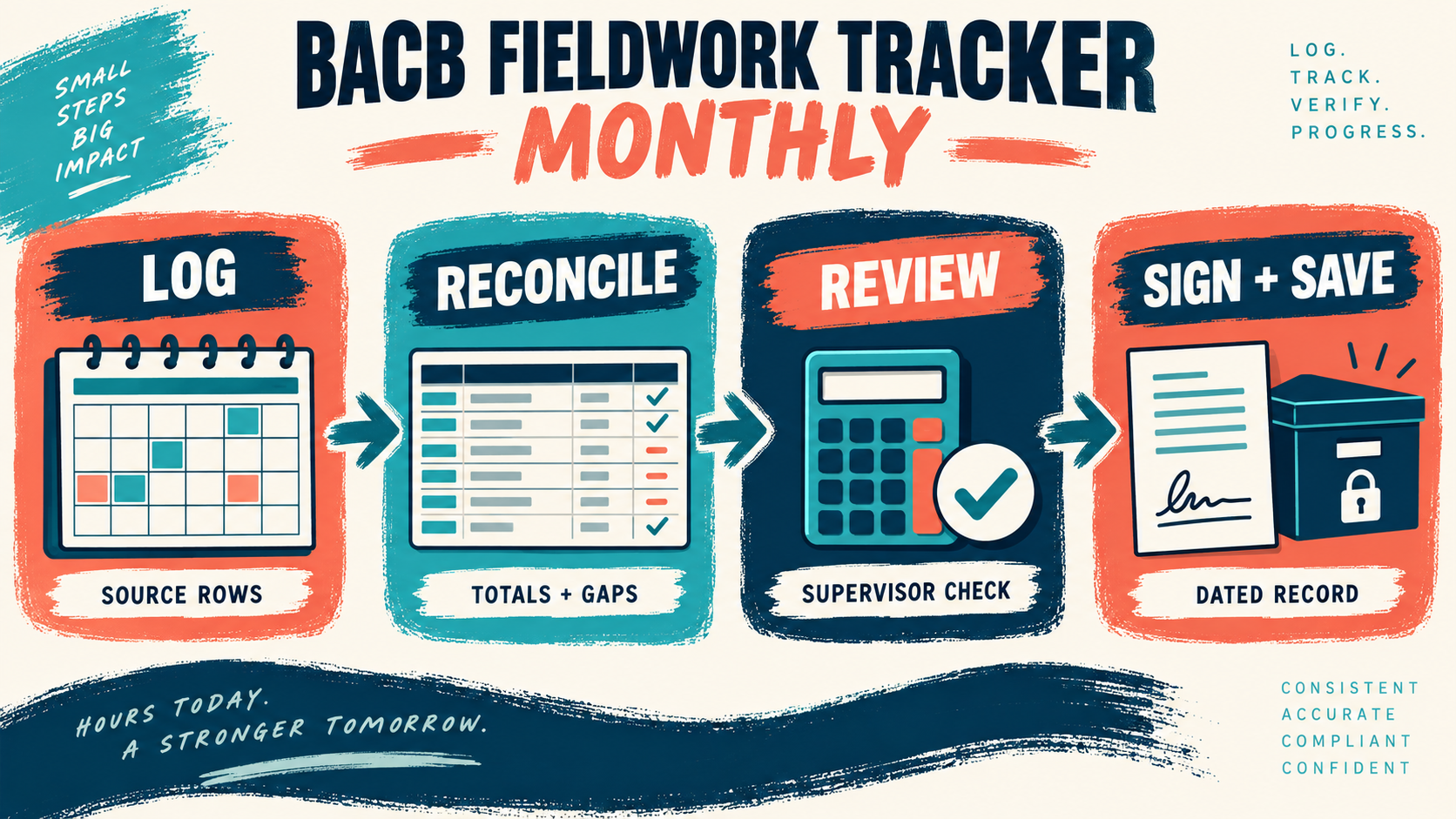
A Four-Step Month-End Review Workflow
Use the same sequence every month so that a busy period does not change your standard of review.
- Log. Close the source-entry window for the month and make sure late entries are labeled rather than silently inserted.
- Reconcile. Compare source rows with monthly totals, supervision records, observation notes, and the requirement settings that were active during the period.
- Review. Share the month with the supervisor through the agreed secure process. Resolve classification questions and record the explanation for any correction.
- Sign and save. Complete the applicable Monthly Fieldwork Verification Form, obtain the required signatures, and store the dated form with the reviewed source record.
Consider a month with 104 logged hours, two supervision entries, and one activity still marked “question.” The tracker should not simply turn the month green. It should show the 104 hours, preserve the question, and keep the form in review status until the classification is resolved. That is the difference between a tracker that supports supervision and a dashboard that only displays progress.
How the Tracker Relates to Monthly and Final Verification Forms
The tracker and the official forms serve different purposes. The tracker preserves detail across the month; the Monthly Fieldwork Verification Form summarizes the hours that count for that supervisory period and records the trainee and supervisor attestation. The Final Fieldwork Verification Form closes an organized fieldwork experience and must be supported by the monthly documentation.
Current BACB form instructions also distinguish supervisory structures. An individual supervisor arrangement and multiple supervisors at one organization use different versions. The current official form page warns that incomplete documents can result in the month’s hours being lost, and it instructs both parties to retain a copy for at least seven years. Check the current version, the signing deadline, and the instruction not to submit the form unless requested by BACB or required by the application process.
| Question | Tracker answer | Form action |
|---|---|---|
| What happened this month? | Review the dated source rows and supervision notes. | Transfer only the reconciled values to the applicable monthly form. |
| Who signs? | Track the responsible supervisor and trainee for the arrangement. | Use the form version for an individual supervisor or organization structure. |
| What gets retained? | Keep source records, correction notes, and a dated review copy. | Keep the signed verification form and related contract or amendment. |
Use the current BACB documentation FAQ when the tracker and the form appear to disagree. Do not solve a mismatch by changing the form total without identifying which source row or rule produced the difference.
How to Handle Multiple Supervisors and Partial Months
Multiple-supervisor arrangements need an explicit key. Every source entry should identify the supervisor or organization that owns the period, and every contract or amendment should be stored with the records it governs. The monthly summary should make it possible to filter the month by supervisor without accidentally adding two arrangements together twice.
Partial months need the same care. A month with a start date, end date, or change in supervisor is not automatically wrong, but the tracker should show the dates and the reason the period is partial. Compare the result with the applicable BACB requirement edition and the form instructions instead of applying a rule copied from an older workbook. At the end of the review, confirm:
- The responsible supervisor and trainee names match the form and account records.
- The month and fieldwork structure are identified consistently.
- Hours, supervision, observations, and notes reconcile to the source record.
- Each required signature and date is present before the record is archived.
How to Control Requirement and Form Versions
Do not treat “monthly” as a timeless category. A tracker may contain a monthly maximum, supervision percentage, observation field, or deadline from a different requirement edition. The current BACB 2027 requirements page and current handbook should control the version you use.
Put the requirement edition and form version in the header of every monthly summary. If you change settings, save the earlier version and add a transition note rather than recalculating signed months in place. The BACB application-processing page can also change its document-version guidance, so check it before preparing an application package.
Common Monthly Tracking Mistakes
- Confusing a monthly tracker with a monthly verification form. The tracker organizes evidence; the official form records the attestation and signatures.
- Waiting until the end of the year. A monthly exception is easier to clarify while the work and supervision discussion are still fresh.
- Overwriting the source record. Preserve the original reviewed copy and document a correction instead of erasing the history.
- Using one total for multiple supervisors. Filter and reconcile each arrangement before combining totals.
- Relying on a “pass” color. Green formatting is not evidence of qualifying work or an official review.
- Keeping the only copy on a work device. Store records in a secure, accessible archive consistent with privacy and workplace rules.
Frequently Asked Questions
Is a monthly fieldwork tracker required by BACB?: BACB requires an ongoing documentation system and the applicable verification forms, but a particular third-party tracker layout is not automatically required. Use the current handbook and fieldwork resources to determine what your record must contain.
When should the Monthly Fieldwork Verification Form be signed?: Use the signing instruction printed on the current form for the requirement edition and structure that apply to you. Current BACB form materials commonly state a deadline tied to the last day of the calendar month following the month of supervision; verify the current version before relying on that date.
Can a monthly tracker calculate whether I have enough supervision?: It can calculate a comparison using the settings you enter. It cannot decide whether the underlying supervision, activity classification, observation, or documentation meets the applicable requirements. Treat the result as a prompt for supervisor review.
Should I use Excel, Google Sheets, or a paper log?: Choose a system you can use consistently, secure, review, and preserve. The platform matters less than row-level detail, transparent calculations, version control, privacy, and agreement with the current official forms.
Can fieldwork tracking replace BCBA exam preparation?: No. A monthly tracker protects your eligibility record; it does not measure readiness for the BCBA exam. Once the month-end documentation is organized, use the free BCBA mock exam as a separate practice step. It does not provide supervision, approve hours, or guarantee certification.
The best BACB fieldwork tracker monthly workflow is a disciplined loop: log the source entries, reconcile the month, review questions with the supervisor, complete the current official form, and save a dated record. That structure protects both the numbers and the explanation behind them. For targeted review, use our bacb fieldwork tracker monthly practice questions to apply the concept in exam-style scenarios.
Take the Free BCBA Mock Exam
If you want a low-pressure way to check your recall, use the free practice resource below. Take the Free BCBA Mock Exam